Export the required files
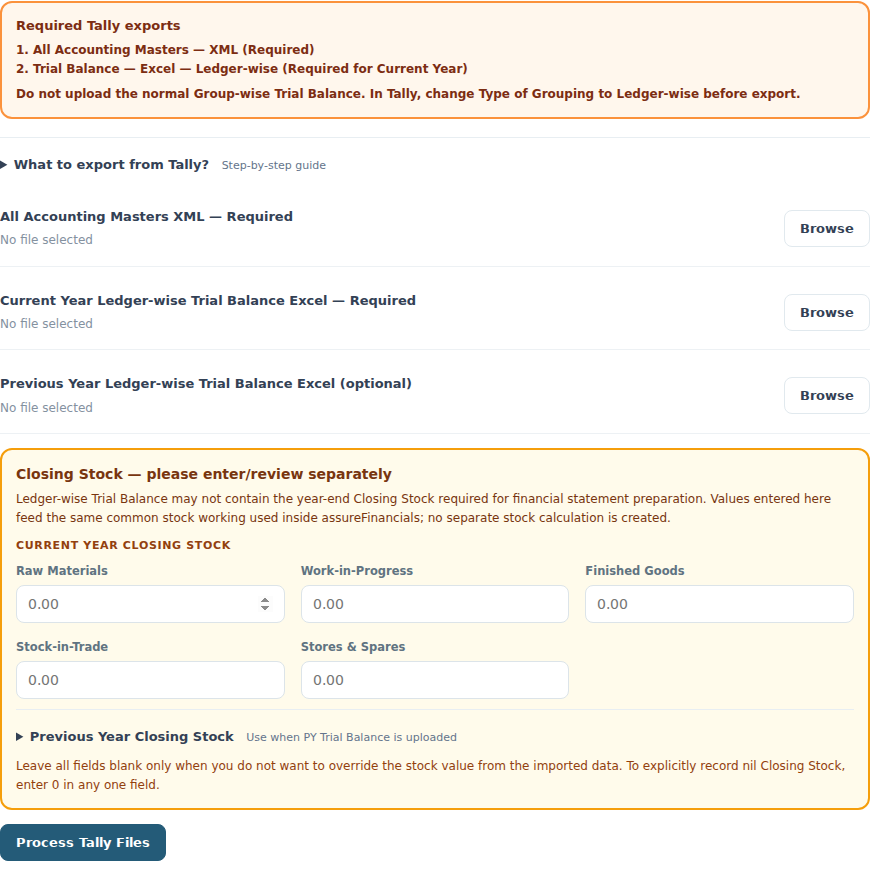
- From Tally, export All Accounting Masters together as XML. This supplies ledger/group structure.
- Open Trial Balance and set Type of Grouping to Ledger-wise. Select the CY period and export to Excel.
- If you need comparatives, export PY Trial Balance in the same ledger-wise format for the PY period.
Review points
- The public converter requires a ledger-wise TB. A normal group-wise summary does not provide the individual ledger detail this workflow needs.
Upload and review
- Open Convert Old Format to New → Tally Data → Upload Tally Files, or Import Centre → Tally → Upload Tally Files for a saved client.
- Select the required Masters XML and CY Trial Balance Excel; add the PY Trial Balance when available.
- Review CY/PY closing-stock values separately. Leave fields blank only when you intend to retain the recognised stock; enter zero explicitly to record nil stock.
- Select Process Tally Files in the converter. Confirm entity, period, recognised balances and groupings, then generate or save into the app.
Resolve an import problem
Review points
- Check that the files relate to the intended company and dates. Confirm that the TB is ledger-wise and has the expected amounts.
- Review the error message before changing files. Do not manufacture missing balances to make totals agree.
- After a successful import, review stock and supporting workings; not every detail required for notes is contained in a TB.
Continue with a related guide
- Prepare your first financial statements
- Connect Tally directly
- Convert old Excel financials to the new format
- Import CY/PY and refresh an existing year
- Review ledger grouping and opposite balances
- Edit notes, capital, PPE and closing stock
- Review alerts, signing details and PDF/Excel downloads
- Use previous-year ITR and supporting-data imports